I test smart tools so you don’t lose your mind building online.

AI Automation Tools Showdown: Claude vs. ChatGPT vs. Copilot (Which Saves You the Most Time?)
Listen babe, we're all trying to work smarter, not harder, right? If you're anything like me, you've probably wondered which AI tool actually saves you the most time instead of just adding another subscription to your already crowded tech stack. After months of testing Claude, ChatGPT, and Copilot in my own chaotic workflow, I'm spilling all the tea on which one deserves your precious time (and money).
10/28/20254 min read
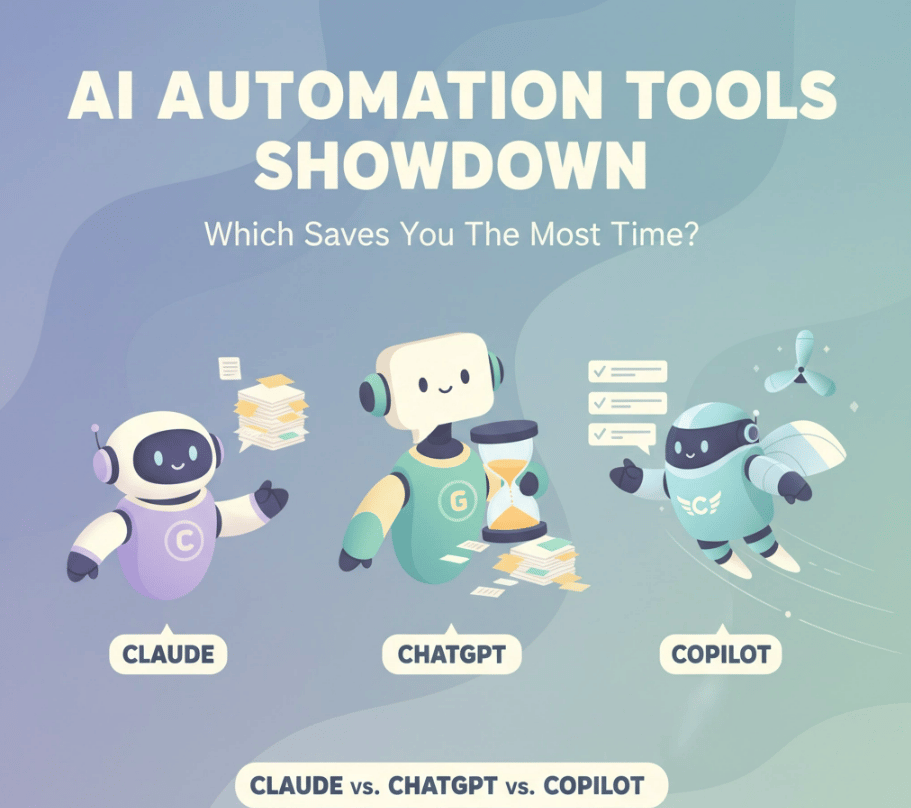

AI Automation Tools Showdown: Claude vs. ChatGPT vs. Copilot (Which Saves You the Most Time?)
Listen babe, we're all trying to work smarter, not harder, right?
If you're anything like me, you've probably wondered which AI tool actually saves you the most time instead of just adding another subscription to your already crowded tech stack. After months of testing Claude, ChatGPT, and Copilot in my own chaotic workflow, I'm spilling all the tea on which one deserves your precious time (and money).
The short answer? It depends on how you actually work. ChatGPT wins for versatility queens who juggle everything, Copilot is perfect if you live in Microsoft-land, and Claude is your bestie for complex thinking tasks that need to be right the first time.
ChatGPT: Your Multi-Talented Best Friend
Think of ChatGPT as that friend who's good at literally everything – writing, research, brainstorming, even generating images when you need them. It's like having a Swiss Army knife for your business.
Where ChatGPT Actually Saves You Time:
ChatGPT shines because it eliminates the need to jump between different apps all day long. Need to brainstorm blog topics? Check. Want to create a social media post AND the image to go with it? Done. Need to research your next affiliate product? It's got web search built right in.
The real time-saver here is the custom GPTs feature. I've created specific versions for different parts of my business – one for email marketing, another for course creation, and even one that helps me write product descriptions in my brand voice. It's like having specialized team members who never need coffee breaks.
The Reality Check:
Sometimes ChatGPT tries to be too helpful and gives you answers that sound great but need fact-checking. For complex stuff, you might find yourself going back and forth more than you'd like. But honestly? For most of the day-to-day content creation and brainstorming, it's a total game-changer.
Claude: The Perfectionist Who Gets It Right
If ChatGPT is your multi-talented friend, Claude is that incredibly smart colleague who always turns in flawless work. This AI is all about quality over quantity, and honestly, sometimes that's exactly what you need.
Where Claude Actually Saves You Time:
The biggest time-saver with Claude? You spend way less time editing and revising. When I need to write something important – like sales pages, email sequences, or complex tutorials – Claude usually nails it on the first try.
I love using Claude for analyzing long documents, competitor research, and creating detailed content strategies. It's also brilliant at breaking down complex topics into digestible pieces, which is perfect for course creation or turning one big idea into multiple pieces of content.
The Reality Check:
Claude doesn't play well with as many other tools, so you might find yourself copying and pasting between apps more often. It's also not the best for quick, casual questions – it's more like calling in a consultant when you really need to get something right.
Copilot: The Ultimate Microsoft Sidekick
Here's the thing about Copilot – if you're already living in the Microsoft world (Outlook, Word, Excel, Teams), this tool is going to blow your mind. It's like having an assistant who already knows exactly how you work.
Where Copilot Actually Saves You Time:
The magic of Copilot is that it works inside the tools you're already using. Writing an email in Outlook? Copilot can draft it. Creating a presentation in PowerPoint? It'll help with that too. Analyzing data in Excel? You don't even need to leave the spreadsheet.
For entrepreneurs who've built their business around Microsoft tools, this integration eliminates so much friction. No more switching tabs, copying and pasting, or trying to remember what you were working on five minutes ago.
The Reality Check:
If you're not a Microsoft person, Copilot loses a lot of its appeal. It's also not great for creative brainstorming or open-ended conversations. Think of it as incredibly efficient but somewhat specialized.
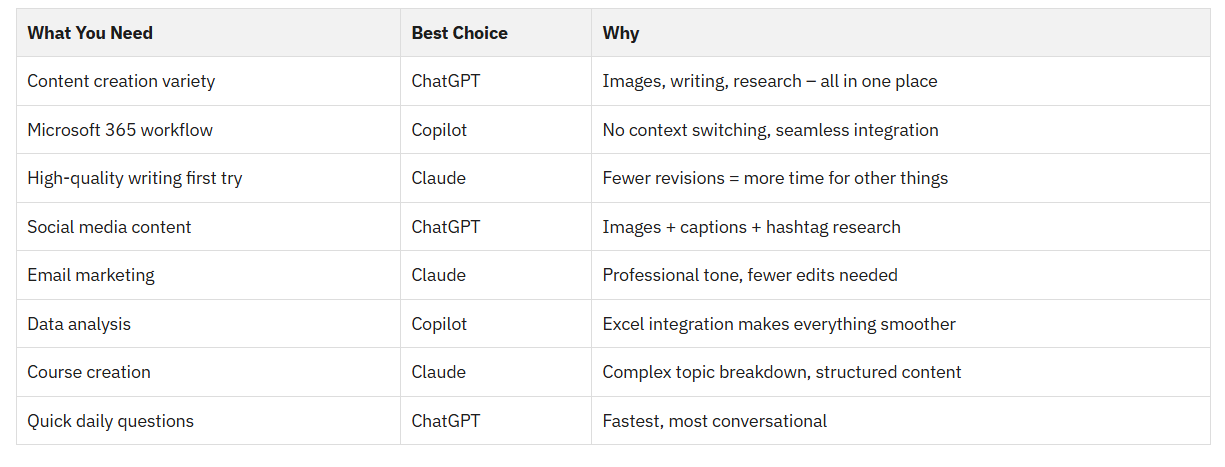
The Lazy Girl's Comparison Breakdown
Let me break this down in a way that actually matters for your day-to-day business building:
My Personal Time-Saving Strategy
Okay, here's what I actually do in my business...
I use all three, but strategically. ChatGPT is my daily driver for content ideas, social media posts, and quick research. When I need to write something important like sales copy or course modules, I switch to Claude because I know it'll be closer to perfect on the first draft.
And since I handle a lot of admin stuff in Excel and Outlook, Copilot saves me tons of time on data analysis and professional emails.
The key is not trying to force one tool to do everything – that's where you actually lose time instead of saving it.
Which One Should You Start With?
If you're just getting started: Go with ChatGPT. It's the most versatile and will give you the biggest bang for your buck while you figure out your workflow.
If you live in Microsoft apps: Definitely try Copilot first. The integration will save you more time than any features from other tools.
If you create a lot of long-form content: Start with Claude. The quality output will save you hours of editing time.
The Bottom Line
The best AI tool for saving time isn't necessarily the smartest one – it's the one that fits seamlessly into how you actually work.
ChatGPT wins for versatility and creative tasks, Claude dominates for quality and complex work, and Copilot is unbeatable if you're already committed to Microsoft tools.
My advice? Try the free versions of each for a week and see which one actually makes your daily tasks easier, not just more complicated. The goal is to build your business the lazy-girl way, not add more steps to your already busy life.
What AI tool has saved you the most time in your business? Drop a comment and let me know which one you're loving (or which one is driving you crazy)!